
Meta Description:
Discord Checkpoint 2025 is finally live, giving users a personalised wrap-up of their year on the app. Here’s what it includes, how to view it, and how you can share your Checkpoint with friends.
Discord has launched its first-ever Discord Checkpoint, a personalised end-of-year wrap-up designed to show users how they spent their time on the platform in 2025. Inspired by the popularity of Spotify Wrapped, this new feature highlights your top activities, most active chats, favourite servers, and even the games you played the most while hanging out with friends online.
Rolling out from December 4, Discord Checkpoint celebrates the platform’s 10th anniversary and marks a major moment for the community. While Discord has not confirmed whether it will return every year, the company has hinted that “plans for Checkpoint beyond 2025 are still unfolding.” For now, users can enjoy a fun and detailed look at their digital habits from the past year.
What Discord Checkpoint 2025 Shows
Discord Checkpoint gathers key stats to give you a clear picture of how you used the platform. These highlights may include:
- Total hours spent in voice chats
- Friends you talked to the most
- Your most active servers
- Most-used emojis
- Favourite and most-played games
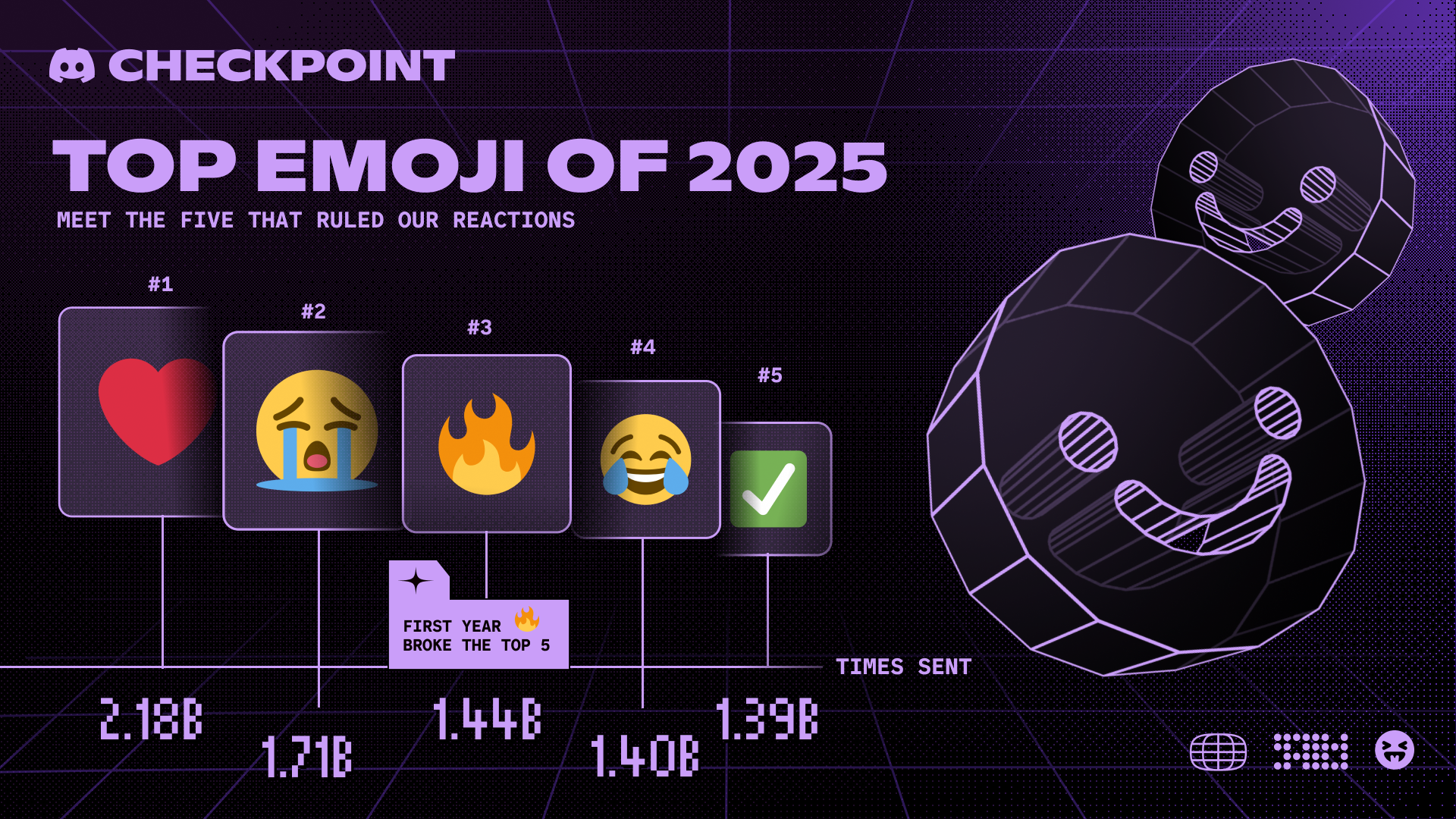
Many users have already shared surprising numbers, from thousands of voice chat minutes to unexpected emoji preferences. For example, the global top emojis of 2025 include the red heart, sobbing face, fire emoji, crying-laughing face, and the green tick.
How to View Your Discord Checkpoint
Discord has made it easy for users to access their personalised recap on both desktop and mobile.
On Desktop
- A pop-up should appear automatically when you open Discord.
- If not, click the flag icon in the top-right corner to open your Checkpoint.
On Mobile
- Tap the You icon in the bottom-right corner.
- Select the green Checkpoint banner to view your recap.
If your Checkpoint is not showing, you may need to update your app. Desktop users can restart Discord to trigger an update, while mobile users may need to refresh the app through their device’s app store.
Why Some Users May Not See a Checkpoint
Not everyone will receive a 2025 Checkpoint. Discord requires users to have:
- Been active on the platform in 2025
- Enabled “use data to personalise your Discord experience” in privacy settings
New or inactive users will not have enough data for a personalised recap. However, Discord still offers a temporary decorative profile frame for everyone, even those without a Checkpoint.
Discord Checkpoint vs Spotify Wrapped: A Quick Comparison
Here’s a simple comparison to understand how Checkpoint differs from other recap features:
| Feature | Discord Checkpoint 2025 | Spotify Wrapped |
|---|---|---|
| Focus | Chat, gaming, servers, emojis | Music listening habits |
| Sharing | Direct sharing in Discord | Social media sharing |
| Availability | Only for active 2025 users | All users with listening data |
| Purpose | Celebrate 10-year anniversary | Annual summary |
Share Your Checkpoint Before It Disappears
Users can share their Checkpoint directly from the final screen using the built-in Share button or by taking a screenshot. The feature, along with the profile frame, remains available until January 15, so make sure to check it out before it disappears.
Discord Checkpoint 2025 gives users a fun and nostalgic look back at a full year of conversations, gaming sessions, and community moments. Whether you spent hours chatting with friends or jumping into game lobbies, this wrap-up is a great way to relive your favourite digital memories.